Grids
The Grid settings allow users to configure a site’s power draw from the grid or localized power generation infrastructure such as solar arrays.
Any grids specified in the Setup > Lists > Electrical Grids will be listed in the Grid Input table with power draw specifications to be entered under various conditions.
The simulation can use different values depending on whether it is day or night and whether the condition is dry or wet.
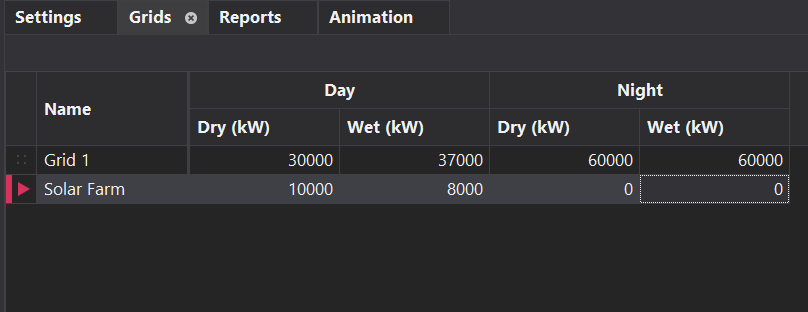
| Section Column | Description |
|---|---|
| Grids Name | This is the name of the grids that you will use for your power which is already defined in the Setup List workstep. |
| Day – Dry (kW) | The power value used during daytime under dry weather conditions. |
| Day – Wet (kW) | The power value used during daytime under wet weather conditions. |
| Night – Dry (kW) | The power value used during nighttime under dry weather conditions. |
| Night – Wet (kW) | The power value used during nighttime under wet weather conditions. |